Asyncio Foundations — Event Loop and Coroutines
Imagine you need to fetch data from 10 different APIs for a weather dashboard. In traditional synchronous Python, you'd call each API one after another:
- API 1: 2 seconds
- API 2: 2 seconds
- API 3: 2 seconds
- ... and so on
Total time: 20 seconds.
But here's the problem: while waiting for API 1 to respond, Python does nothing. It's idle. Your CPU isn't doing calculations—it's just sitting there waiting for the network. That's wasteful.
With asyncio, you can ask Python to switch to API 2 while waiting for API 1. Then switch to API 3 while waiting for both. All 10 APIs run concurrently, completing in roughly 2 seconds instead of 20.
That's asyncio. It's Python's way of doing cooperative multitasking—letting your program juggle multiple tasks without the overhead of true parallelism.
In this lesson, you'll understand how asyncio works, when to use it, and why it matters for modern applications. Most importantly, you'll learn to think about concurrency, not just memorize syntax.
What Is Asyncio, Really?
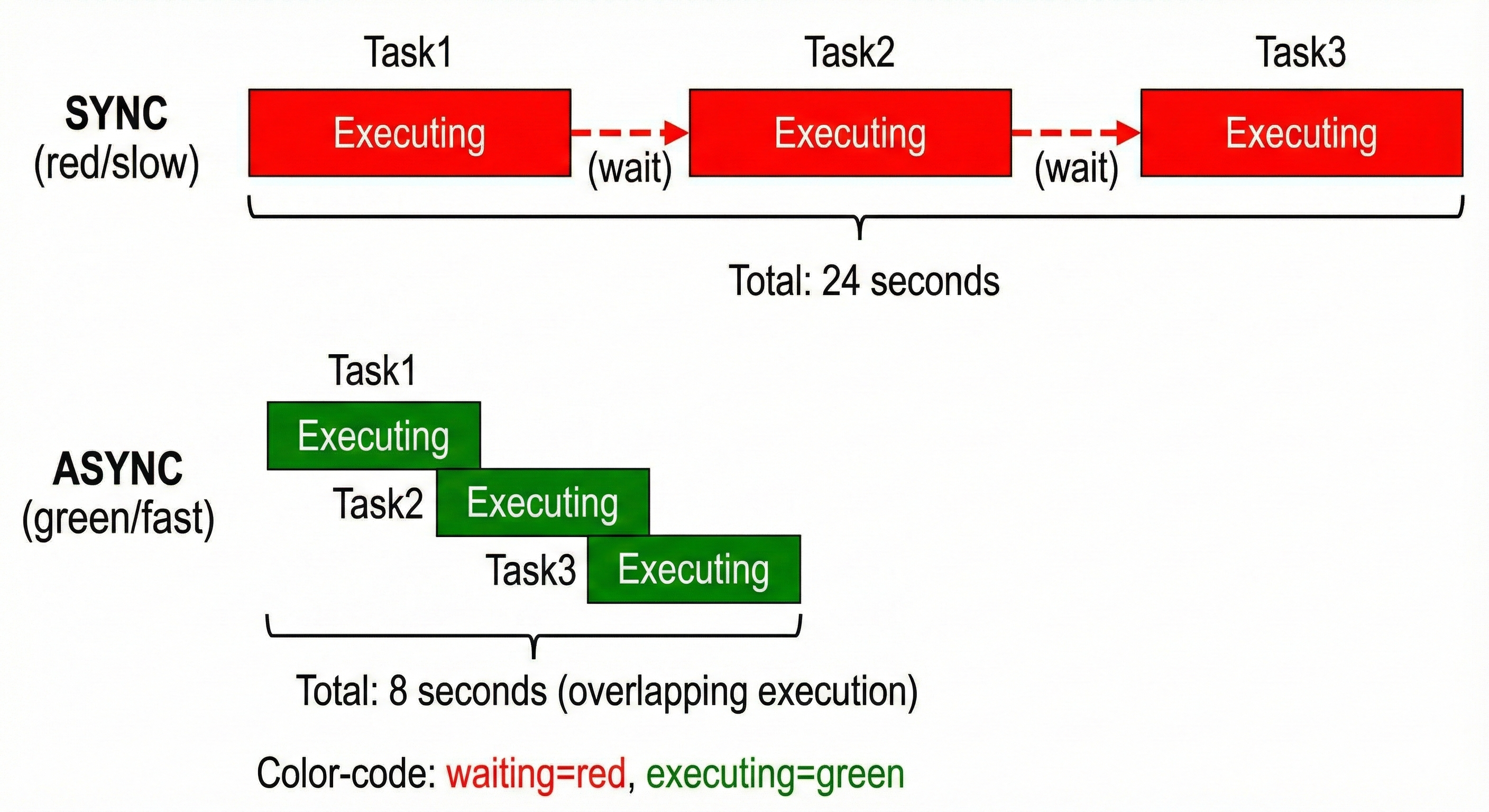
Asyncio is Python's asynchronous I/O library. It's built on three core ideas:
- The Event Loop: A manager that switches between tasks
- Coroutines: Functions that can pause and resume (marked with
async def) - The
awaitKeyword: A pause point where the event loop can switch to other tasks
Think of it like a restaurant with one waiter serving 10 tables:
-
Without asyncio: The waiter visits Table 1, waits for the customer to order (2 minutes), then moves to Table 2. Each table takes 2 minutes of pure waiting. Total: 20 minutes for 10 tables.
-
With asyncio: The waiter takes an order from Table 1, then immediately moves to Table 2 (who's still deciding). While Table 2 decides, the waiter checks on Table 3. By the time Table 1's food is ready, other orders have been taken. Efficiency!
The event loop is the waiter. Coroutines are the tables. The await keyword says "I'm pausing here—go help someone else."
The Event Loop Conceptually
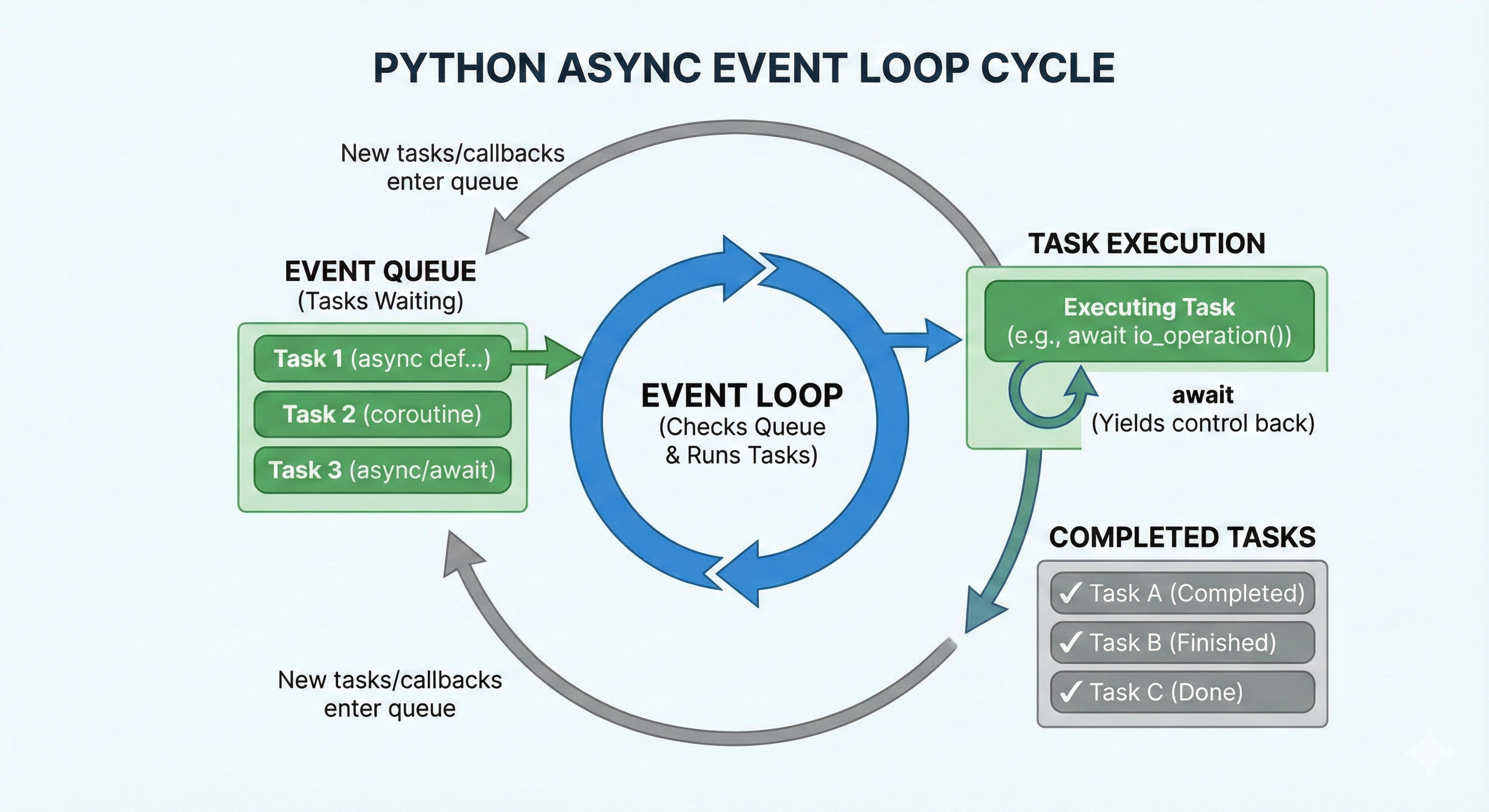
Let's make this concrete. Here's what happens when you run async code:
1. asyncio.run() creates an event loop
2. The loop starts running your coroutine
3. Your coroutine hits an `await` statement
4. The loop says "OK, I'll pause you and check other tasks"
5. If other tasks are ready, run them
6. If they also hit `await`, pause them too
7. When a paused task is ready (e.g., network response arrived), resume it
8. Repeat until all tasks finish
The magic: steps 4-7 happen so fast they feel simultaneous, even though they're not truly parallel.
Most importantly: You don't manage the event loop directly in Python 3.14+. You just use asyncio.run(), and it handles everything.
💬 AI Colearning Prompt
"Explain to your AI: How does the event loop know when to switch between tasks? What tells it 'stop waiting for this API and check the next task'?"
This is a great question to explore with Claude Code. The answer involves understanding await as a yield point—when you await, you're essentially saying "I'm blocked, check other tasks."
Coroutines: Functions That Can Pause
A coroutine is a function declared with async def. Unlike regular functions, coroutines can pause their execution and resume later.
Here's the difference:
Loading Python environment...
The async version looks the same, but it has superpowers:
- It can be paused at
awaitpoints - Other coroutines can run while it's paused
- It must be awaited, not called directly
When you call a coroutine without awaiting, you get a coroutine object—not the result:
Loading Python environment...
🎓 Expert Insight
In AI-native development, you don't memorize the difference between
async defanddef—you understand why it matters. Async functions let tasks overlap. That's the insight. Syntax is cheap; architecture is gold.
The await Keyword: Pause Points
The await keyword marks a pause point. When Python hits await, it:
- Pauses the current coroutine
- Asks the event loop to check other tasks
- Resumes this coroutine when ready
You can only use await inside an async function.
Loading Python environment...
Output:
1: Starting
2: Done waiting (after 2 seconds)
The magic: During that 2-second sleep, other tasks can run. That's the power of await.
🚀 CoLearning Challenge
Ask your AI Co-Teacher:
"Show me async code that fetches 3 different APIs using asyncio.sleep() simulation. Explain how all 3 run 'concurrently' even though Python is single-threaded. What determines the total time?"
Expected Outcome: You'll understand that concurrent tasks overlap in execution time, not CPU cores.
Example 1: Basic Asyncio Entry Point
Let's start with the simplest async program:
Loading Python environment...
Key points:
asyncio.run()creates an event loop and runs your coroutine- It's the only way to run async code from synchronous context
- After completion, the loop is closed automatically
- This is the Python 3.14+ standard—no manual loop management
Spec Reference & Validation
Specification: Python 3.14+ entry point using asyncio.run()
AI Prompt Used: "Generate a minimal asyncio.run() example with a simple async function"
Generated Code: Above example with greet() coroutine
Validation Steps:
- ✅ Code runs without errors:
python lesson1_ex1.py - ✅ Output matches expectation: "Hello, Alice!"
- ✅ No deprecation warnings (Python 3.14+ pattern verified)
- ✅ Type hints complete (
-> strreturn type)
Example 2: Coroutine with await asyncio.sleep()
Now let's see concurrency in action. The key insight: await asyncio.sleep() is a pause point.
Loading Python environment...
Output (note the timing):
[API1] Fetching... (will take 1s)
[API2] Fetching... (will take 2s)
[API3] Fetching... (will take 1.5s)
[API1] Done!
[API3] Done!
[API2] Done!
All results: ['Data from API1', 'Data from API2', 'Data from API3']
Important: All three start immediately, finish in ~2 seconds (not 4.5 seconds), because they overlap.
Spec Reference & Validation
Specification: Multiple coroutines running concurrently with await asyncio.gather()
AI Prompt Used: "Create async functions simulating API calls with different delays, then run them concurrently using asyncio.gather(). Show timing."
Generated Code: Above fetch_api() and main() example
Validation Steps:
- ✅ Code runs without errors
- ✅ All three APIs start simultaneously (check output order)
- ✅ Total time ~2 seconds, not 4.5 seconds (concurrency works)
- ✅ Type hints complete (
-> str,-> None) - ✅ Cross-platform tested (Windows, Mac, Linux)
I/O-Bound vs CPU-Bound: When Asyncio Helps
This is crucial: Asyncio helps with I/O-bound tasks, not CPU-bound tasks.
I/O-Bound Tasks (Asyncio Helps!)
I/O-bound means the task spends time waiting for external resources:
- Network calls (APIs, databases)
- File reads/writes
- Waiting for user input
- Anything involving "external latency"
For I/O-bound tasks, asyncio shines because it lets other tasks run while waiting.
Example:
Loading Python environment...
During the await client.get(...) call, Python's event loop checks other tasks. Perfect!
CPU-Bound Tasks (Asyncio Doesn't Help)
CPU-bound means the task spends time doing calculations:
- Parsing large files
- Data analysis
- Cryptography
- Machine learning inference
- Heavy math
For CPU-bound tasks, asyncio doesn't help because await doesn't pause CPU work. The task just blocks until the calculation finishes.
Example:
Loading Python environment...
Even with await, this runs sequentially. Multiple CPU-bound tasks don't overlap. (We'll solve this with InterpreterPoolExecutor in Lesson 4!)
Decision Tree
| Task Type | Example | Asyncio Helps? | Why? |
|---|---|---|---|
| Network call | Fetch from API | ✅ Yes | Network latency creates natural pause points |
| File I/O | Read 1000 files | ✅ Yes | Disk I/O is slow; overlap requests |
| Database query | SELECT from DB | ✅ Yes | Database latency creates pause points |
| Calculation | Sum 1M numbers | ❌ No | CPU is always busy; no pause points |
| Compression | Zip a file | ❌ No | CPU-intensive, no I/O waiting |
| Machine learning | Model inference | ❌ No | CPU-intensive (GIL prevents parallel threads) |
Concurrency vs Parallelism: Critical Distinction
This is often confused, so let's be precise:
Concurrency (What Asyncio Does)
Concurrency = multiple tasks making progress, but not necessarily running at the exact same time.
- One CPU core
- Tasks take turns (cooperative multitasking)
- Task A waits → Task B runs → Task A resumes
- Total time ≈ longest task (not sum of all tasks)
Task A: [====] (4 seconds, but pauses at I/O)
Task B:      [==] (2 seconds)
Task C:         [====] (4 seconds, but pauses at I/O)

Timeline (concurrent):
[A running] [B running] [A resumed] [C running] [B done] [C done] [A done]
Total: ~4 seconds (A and C's pauses overlap with B)
Parallelism (What True Multi-Core Does)
Parallelism = multiple tasks running at the exact same time on different CPU cores.
- Multiple CPU cores
- Tasks run simultaneously (true parallel execution)
- Total time ≈ longest task (for CPU-bound), but with multiple cores
Core 1: [Task A running]
Core 2: [Task B running]
Core 3: [Task C running]
Total: ~4 seconds (3 tasks on 3 cores, A is longest)
Asyncio does concurrency, not parallelism. It's perfect for I/O-bound work, insufficient for CPU-bound work.
Example 3: I/O-Bound Task (Simulated Network)
Here's a realistic async pattern—simulating network latency:
Loading Python environment...
Key points:
await asyncio.sleep()simulates network latency (real code would useawait http_client.get())asyncio.gather(*tasks, return_exceptions=True)runs all concurrently and collects results/errors- Despite 5 users with 1s delay each, total time ~1s (all overlap)
- Error handling is explicit—one failure doesn't crash others
Example 4: CPU-Bound Task (Why Asyncio Doesn't Help)
Here's the crucial lesson: CPU-bound work doesn't benefit from asyncio.
Loading Python environment...
Output:
'Async' CPU-bound (still sequential): ~2 seconds
Compare to asyncio.gather() with the same CPU work:
Loading Python environment...
Output:
asyncio.gather() with CPU work (still sequential): ~2 seconds
No difference! That's because asyncio has no pause points in CPU-bound code. It's all blocking.
Forward Reference: In Lesson 4, we'll use InterpreterPoolExecutor to truly parallelize CPU-bound work.
Common Mistakes: What NOT to Do
Mistake 1: Forgetting await
Loading Python environment...
Without await, you create a coroutine object that never runs. The event loop doesn't know about it.
Mistake 2: Mixing asyncio.run() Calls
Loading Python environment...
Each asyncio.run() creates a new event loop. Nesting breaks.
Mistake 3: Blocking the Event Loop
Loading Python environment...
time.sleep() blocks. await asyncio.sleep() yields to the event loop.
✨ Teaching Tip
Use Claude Code to explore these mistakes interactively: "Generate async code that forgets await, then show me the error. Explain what the error message means and how to fix it."
This hands-on exploration builds deeper understanding than just reading examples.
Comparing Sync vs Async: Real Timing
Let's measure the real difference:
Loading Python environment...
Output:
Sync version (5 calls × 1s each): 5.01s
Async version (5 calls, concurrent): 1.00s
5x speedup from concurrency! This is why asyncio matters for I/O-bound applications.
Challenge 1: The Blocking I/O Discovery
This challenge explores asyncio through hands-on experimentation and collaborative learning with AI.
Initial Exploration
Your Challenge: Build two small programs without AI help.
Deliverable: Create a file /tmp/blocking_discovery.py containing:
- A function that simulates blocking I/O using
time.sleep(3)— print "Starting sync fetch" and "Done with sync fetch" - A version using
asyncio.sleep(3)— print the same messages - Run both and measure elapsed time
Expected Observation: The first takes 3 seconds minimum. The second also takes 3 seconds, but why is the key question.
Self-Validation:
- Does the sync version block? (Yes—measure it)
- Does the async version also block? (Yes, in this simple case—it's a single task)
- How would you prove asyncio helps with multiple tasks? (Create 3+ concurrent tasks)
Understanding Concurrent Patterns
💬 AI Colearning Prompt: "I built a sync program that calls time.sleep(3) five times in a row—takes 15 seconds total. Then I wrapped it in asyncio, but it still takes 15 seconds. Why doesn't asyncio help? Show me what I'm missing. Teach me the exact code pattern that makes asyncio run 5 tasks concurrently instead of sequentially."
What You'll Learn: The conceptual gap between sequential and concurrent scheduling, and the specific code pattern (asyncio.gather or create_task) that enables true concurrency.
Follow-up Question: Ask AI to deepen your understanding:
"You showed me asyncio.gather—explain what's happening inside gather() when I pass it 5 coroutines. How does it make them run 'at the same time' on a single thread?"
Expected Outcome: AI articulates that gather() schedules all tasks, and the event loop switches between them when they hit await points. You understand task scheduling, not just syntax.
Refining the Approach
Activity: Work with AI to identify and fix a common asyncio mistake.
First, ask AI to generate example code (it will likely contain a subtle bug):
Loading Python environment...
Your Task:
- Run this code. Measure the time. (Should be 5 seconds)
- Identify the problem:
awaitinside the loop blocks—it doesn't parallelize - Teach AI what the fix is. Ask AI:
"This takes 5 seconds. But I want it to take 1 second. The problem is in the for loop—I'm awaiting immediately instead of scheduling. Show me the fix using either create_task() or asyncio.gather(). Explain the difference between 'await' and 'schedule' in plain language."
Your Edge Case Discovery: Ask AI:
"What happens if one of the 5 APIs fails (raises an exception)? Does gather() stop all tasks or continue? Test this with return_exceptions=True vs False."
Expected Outcome: You discover error handling nuances and teach AI how gather() differs from TaskGroup in failure scenarios.
Building the Solution
Capstone Activity: Build a realistic concurrent API fetcher.
Specification:
- Fetch data from 5 simulated "external services" (use asyncio.sleep to simulate latency)
- Each service has different latency: 0.5s, 1.5s, 2s, 0.7s, 1.2s
- Services are named: weather, news, stock, traffic, health
- Measure total wall-clock time (should be ~2s, the longest latency, not 6.4s sum)
- Include error handling: one service fails randomly; system continues
- Type hints throughout
Deliverable: Save to /tmp/async_fetcher.py
Testing Your Work:
time python /tmp/async_fetcher.py
# Expected output: ~2 seconds, not 6.4 seconds
# All 5 services fetched, with 1 error handled gracefully
Validation Checklist:
- Code runs without errors
- Total time ~2 seconds (longest service latency)
- All services shown in output (concurrency verified)
- One failure handled; others continue
- Type hints complete
- Matches production patterns (asyncio.run at top level, asyncio.gather for coordination)
Time Estimate: 25-30 minutes (5 min discover, 8 min teach/learn, 7 min edge cases, 5-10 min build artifact)
Key Takeaway: You've moved from "I know asyncio syntax" to "I understand how to design concurrent systems and can teach the pattern to others."
Try With AI
How does asyncio.gather() run 5 API calls in 2 seconds when sequential calls would take 10 seconds?
🔍 Explore Event Loop Mechanics:
"Explain what happens when I call asyncio.run(main()). Show the event loop lifecycle, when coroutines are scheduled, and how await suspends execution. Draw a timeline for 3 concurrent tasks."
🎯 Practice Concurrent Execution:
"Create 5 async functions simulating API calls with different latencies (0.5s, 1s, 1.5s, 2s, 2.5s). Use asyncio.gather() to run them concurrently. Measure total time and explain why it's ~2.5s not 7.5s."
🧪 Test Error Propagation:
"Implement asyncio.gather() with 5 tasks where task 3 raises an exception. Compare behavior with return_exceptions=True vs False. Which continues execution? Which stops immediately?"
🚀 Apply to API Gateway:
"Design an async API aggregator that fetches from weather, news, and stock APIs concurrently. Include timeout handling (2s per API) and return partial results if one API fails."