Making Decisions with Conditionals
Every program you write needs to make decisions. Should we display an error message? Is the user old enough to access this content? Did the payment go through successfully? These yes-or-no questions drive the logic of your programs.
In this lesson, you'll learn how Python makes decisions using conditional statements—code that runs only when certain conditions are true. You'll start with simple yes-or-no decisions (if statements), progress to either-or choices (if-else), and build up to complex multi-way decisions (if-elif-else chains). By the end, you'll write programs that respond intelligently to different situations.
Think of conditionals as the traffic signals of your code: they control which path your program takes based on current conditions.
Quick Review: Comparison Operators
Before we dive into conditionals, let's refresh what we learned in Chapter 20 about comparison operators—the building blocks of decision-making.
Comparison operators evaluate a relationship between two values and return True or False:
| Operator | Meaning | Example | Result |
|---|---|---|---|
== | Equal to | 5 == 5 | True |
!= | Not equal to | 5 != 3 | True |
> | Greater than | 7 > 4 | True |
< | Less than | 3 < 10 | True |
>= | Greater than or equal | 5 >= 5 | True |
<= | Less than or equal | 4 <= 9 | True |
Here's a quick example:
Loading Python environment...
Output:
Age: 25
Is adult? True
The expression age >= 18 evaluates to True because 25 is greater than or equal to 18. This boolean result (True or False) is what powers conditional statements.
💬 AI Colearning Prompt
"Why does Python use
==for equality comparison instead of a single=? What does a single=do?"
Quick Review: Logical Operators
Sometimes you need to combine multiple conditions. That's where logical operators come in:
| Operator | Meaning | Example | When True |
|---|---|---|---|
and | Both conditions must be true | age >= 18 and has_license | Both are true |
or | At least one condition must be true | is_weekend or is_holiday | Either is true |
not | Reverses the boolean value | not is_raining | Condition is false |
Quick example:
Loading Python environment...
Output:
Temperature: 75°F
Sunny? True
Nice weather? True
The expression temperature > 70 and is_sunny evaluates to True because both conditions are true.
Now that we've refreshed our memory, let's use these operators to make real decisions in our code!
Making Your First Decision
The if Statement: Single-Condition Decisions
The simplest decision is: "If this condition is true, do something."
Syntax:
Loading Python environment...
Critical: Notice the colon (:) at the end of the if line and the indentation (4 spaces) for the code block that runs when the condition is true. Python uses indentation to define which code belongs to the if statement.
Let's see it in action with age verification:
Loading Python environment...
Expected Output:
Access granted. You are an adult.
Welcome to the platform!
This line runs regardless of age.
What's happening:
- We check:
age >= 18→20 >= 18→True - Because the condition is
True, the indented code runs - The final
print()statement runs no matter what (it's not indented, so it's outside theifblock)
If we change age to 16:
Loading Python environment...
Expected Output:
This line runs regardless of age.
The condition 16 >= 18 is False, so the indented code is skipped entirely.
🎓 Expert Insight
In AI-native development, you don't memorize conditional syntax—you understand WHEN to make a decision. Syntax is cheap; recognizing "my program needs to respond differently based on conditions" is gold.
The if-else Statement: Binary Decisions
What if you want to do one thing when the condition is true and something different when it's false? Use if-else:
Syntax:
Loading Python environment...
Let's check if a number is even or odd:
Loading Python environment...
Expected Output:
7 is odd.
What's happening:
- We check:
number % 2 == 0(is the remainder 0 when divided by 2?) 7 % 2equals1, so1 == 0isFalse- The
elseblock runs instead
If we change number to 8:
Loading Python environment...
Expected Output:
8 is even.
Now 8 % 2 equals 0, so the condition is True and the if block runs.
The if-elif-else Chain: Multiple Conditions
What if you have more than two possibilities? Use elif (short for "else if") to check multiple conditions in sequence:
Syntax:
Loading Python environment...
Important: Python evaluates conditions from top to bottom and stops at the first True condition. Once a condition matches, the rest are skipped.
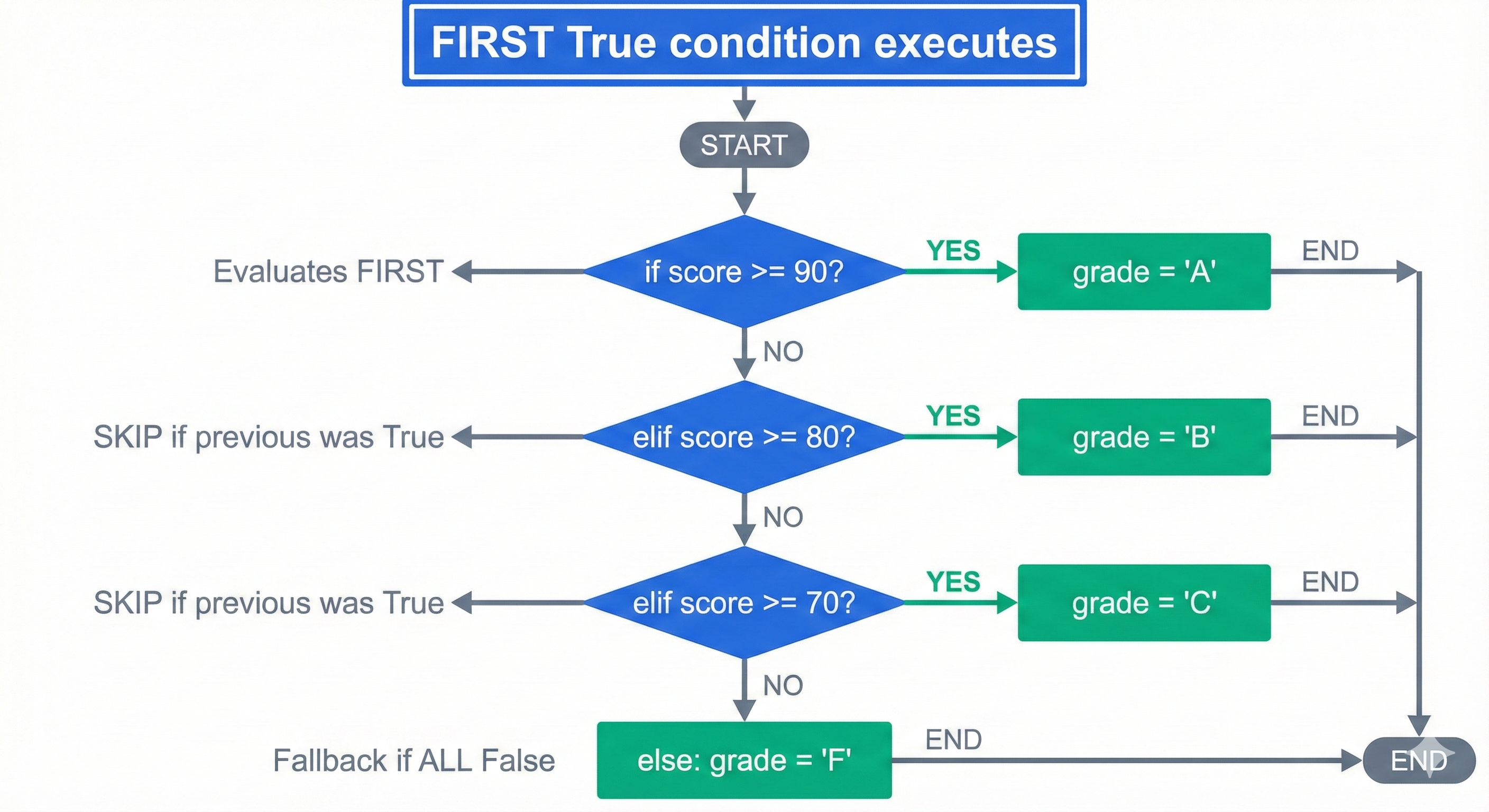
Let's classify grades:
Loading Python environment...
Expected Output:
Score: 85 → Grade: B (Good job!)
Execution trace for score = 85:
- Check
score >= 90→85 >= 90→False(skip this block) - Check
score >= 80→85 >= 80→True(execute this block, stop checking) - Skip remaining
elifandelseblocks
What if score = 95?
Loading Python environment...
Expected Output:
Score: 95 → Grade: A (Excellent!)
The first condition matches, so Python never even checks the rest.
🤝 Practice Exercise
Ask your AI: "Generate a Python if-elif-else statement that categorizes temperature: freezing (below 32°F), cold (32-50°F), mild (51-70°F), warm (71-85°F), or hot (above 85°F). Include type hints and expected output for temperature = 68."
Expected Outcome: You'll understand how to structure multi-condition decision trees and see how order matters (checking ranges from high to low or low to high).
Complex Conditions and Nested Decisions
Now that you understand the basics, let's explore more advanced patterns: combining multiple conditions and nesting decisions.
Complex Conditions with and / or
Real-world decisions often depend on multiple factors. Let's check eligibility for a discount:
Problem: A customer gets a discount if:
- They're a member AND the purchase is over $50, OR
- The purchase is over $100 (regardless of membership)
Tell your AI:
"Generate a Python conditional that checks discount eligibility: customer gets discount if (is_member AND purchase > 50) OR (purchase > 100). Use type hints, test with purchase=75 and is_member=True, then purchase=120 and is_member=False. Show expected output."
AI-Generated Code (Example):
Loading Python environment...
Expected Output (purchase=75, is_member=True):
Purchase: $75.00
Member: True
Discount applied: $7.50 (10%)
Final price: $67.50
Expected Output (purchase=120, is_member=False):
Purchase: $120.00
Member: False
Discount applied: $12.00 (10%)
Final price: $108.00
What your AI should explain:
- Parentheses
()control evaluation order:(is_member and purchase_amount > 50)is evaluated first - The
oroperator connects two possible paths to discount eligibility - First case: member with $50+ purchase → discount
- Second case: any purchase over $100 → discount
Nested if Statements: Multi-Criteria Validation
Sometimes you need to check one condition, and only if that's true, check another condition. This is called nesting.
Problem: Verify if someone can rent a car:
- Must be at least 25 years old
- Must have a driver's license
- If both true, check if they want insurance
Tell your AI:
"Generate nested if statements for car rental validation: check age >= 25, then check has_license, then ask about insurance. Use type hints. Test with age=28, has_license=True, wants_insurance=False. Show expected output and explain why nesting is used instead of a single complex condition."
AI-Generated Code (Example):
Loading Python environment...
Expected Output (age=28, has_license=True, wants_insurance=False):
✓ Age requirement met (25+)
✓ Driver's license verified
○ Insurance declined
Total rental cost: $50.00/day
What if age=22?
Expected Output (age=22):
✗ Rental denied: Must be 25 or older
The nested if statements never run because the first condition fails.
Why nesting instead of and?
You could write: if age >= 25 and has_license and wants_insurance:
But nesting lets you:
- Provide specific feedback at each stage ("age OK, but no license")
- Perform different actions at each level (calculate pricing only if eligible)
- Make the logic easier to read and debug
🎓 Expert Insight
In AI-native development, nested conditionals are a common pattern. You don't memorize the nesting depth—you describe the decision tree to your AI: "First check X, if true then check Y, if that's true then check Z." Your AI handles the indentation and structure; you verify the logic makes sense.
Red Flags: Common Conditional Errors (and How to Fix Them)
Even experienced developers make these mistakes. Recognizing them will save you hours of debugging.
🚩 Red Flag 1: IndentationError
Problem:
Loading Python environment...
Error:
IndentationError: expected an indented block after 'if' statement on line 3
Fix:
Loading Python environment...
AI Troubleshooting Prompt:
"I'm getting IndentationError in my if statement. Here's my code: [paste code]. Explain what's wrong and show the corrected version."
🚩 Red Flag 2: Unreachable Code
Problem:
Loading Python environment...
What's wrong: If score >= 60 is true (which it is for score=85), the elif score >= 80 is never checked. Python stops at the first matching condition.
Fix: Order conditions from most specific to least specific:
Loading Python environment...
AI Troubleshooting Prompt:
"My elif condition for score >= 80 never executes even when score is 85. Here's my code: [paste code]. Explain why and show the fix."
🚩 Red Flag 3: Logical Errors (Impossible Conditions)
Problem:
Loading Python environment...
What's wrong: No value of age can satisfy both age >= 18 and age < 13 simultaneously. This code never runs.
Fix: Use or instead of and, or check your logic:
Loading Python environment...
AI Troubleshooting Prompt:
"My condition
age >= 18 and age < 13never executes. Is this logic correct? If not, what should it be?"
🚩 Red Flag 4: Type Mismatches
Problem:
Loading Python environment...
Error:
TypeError: '>=' not supported between instances of 'str' and 'int'
Why: You can't compare a string ("25") with an integer (18) using >=.
Fix: Convert the string to an integer:
Loading Python environment...
AI Troubleshooting Prompt:
"I'm getting TypeError: '>=' not supported between instances of 'str' and 'int'. Here's my code: [paste code]. How do I fix this?"
Try With AI
Ready to make decisions with if, elif, and else statements?
🔍 Explore Conditional Logic:
"Explain if, elif, and else statements with examples. Show me how Python evaluates conditions top-to-bottom and stops at the first True. Why do we need elif instead of multiple if statements? Demonstrate with age checking: child (
<13), teen (13-17), adult (18+)."
🎯 Practice Decision Trees:
"Create a grade calculator that takes a score (0-100) and returns letter grade: A (90-100), B (80-89), C (70-79), D (60-69), F (
<60). Use if/elif/else with comparison operators. Then extend it to handle edge cases: scores> 100, negative scores, non-numeric input."
🧪 Test Nested Conditions:
"Show me the difference between nested if statements and elif chains. For a login validator checking (1) username exists AND (2) password correct, compare: nested ifs vs. combined condition with 'and'. Which is more readable? Which handles error messages better?"
🚀 Apply to Your Business Logic:
"I'm building [describe your application]. Help me write conditional logic for: eligibility checks, access control, data validation, or workflow routing. Show me the if/elif/else structure with clear conditions and explain why each branch exists."