Date and Time Objects (Python 3.14)
When you build real applications—event scheduling, logging, analytics, user interfaces—you need to work with dates and times. Python's datetime module provides high-level objects that make this manageable. And Python 3.14 introduces NEW parsing methods that simplify a common task: converting user-provided date strings into objects your code can work with.
In this lesson, you'll learn to create date, time, and datetime objects, parse user input using Python 3.14's new methods, and understand the basics of timezone-aware objects. You'll discover that working with dates is less about memorizing format codes and more about understanding WHEN to parse (from user input) versus construct (programmatic dates).
Understanding datetime Objects: Beyond Timestamps
In the previous lesson, you learned about timestamps (seconds since epoch) and the time module. The datetime module takes a different approach—instead of storing everything as a number, it provides objects that represent dates and times as structured data.
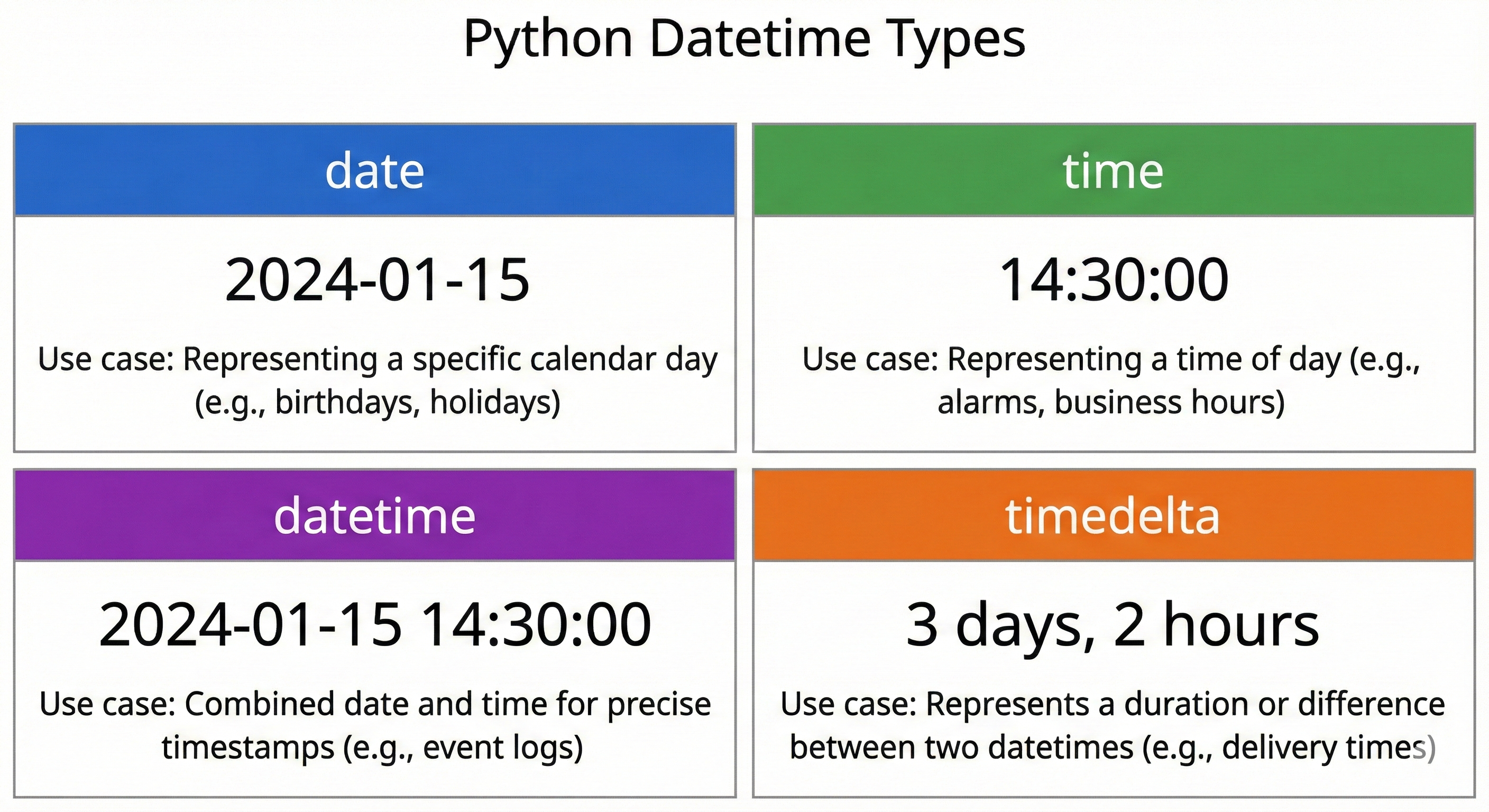
Think of it like this: A timestamp (1699564800.12345) is efficient for comparison and calculation, but hard for humans to read. A datetime object (2025-11-09 14:30:00) is structured—it knows about years, months, days, hours separately.
💬 AI Colearning Prompt
"Why does Python have both the
timemodule (timestamps) and thedatetimemodule (objects)? What's the use case for each?"
Python gives you both because they solve different problems. Use datetime for working with human-readable dates and times. Use time module when you need low-level timing or epoch calculations. This lesson focuses on datetime—the higher-level abstraction you'll use most often.
Creating Date Objects
A date object represents a specific calendar date: year, month, and day.
Loading Python environment...
What's happening: The date constructor takes three parameters: year, month (1-12), and day (1-31, depending on the month). The type hint date tells Python (and anyone reading your code) that the variable holds a date object.
🎓 Expert Insight
In AI-native development, you don't memorize date constructor parameters—you type
date(in your IDE and let AI autocomplete show you the parameters. Your job: understand that a date object separates year/month/day into distinct attributes.
Let's verify this works with different dates:
Loading Python environment...
Output:
New Year 2025: 2025-01-01
Today's example: 2025-11-09
Today is in month 11
Notice: Python stores dates in ISO 8601 format (YYYY-MM-DD), which is the international standard for date representation—perfect for sorting, comparison, and database storage.
Creating Time Objects
A time object represents a time of day: hour, minute, second, and microsecond (millionths of a second).
Loading Python environment...
What's happening: The time constructor takes: hour (0-23, military time), minute (0-59), second (0-59), and optional microsecond (0-999999).
🚀 CoLearning Challenge
Ask your AI Co-Teacher:
"Generate a function that creates a time object from a string like '2:30 PM' and explain why microsecond precision matters in scientific computing."
Expected Outcome: You'll understand why Python uses 24-hour format and why microseconds exist for high-precision timing.
Let's practice:
Loading Python environment...
Creating Datetime Objects
A datetime object combines both—it represents a complete timestamp with both date and time.
Loading Python environment...
What's happening: datetime takes all the parameters of date (year, month, day) plus all the parameters of time (hour, minute, second, microsecond).
✨ Teaching Tip
Use Claude Code to explore what happens when you pass invalid values: "What error do I get if I create date(2025, 2, 30)? Why does February 30th not exist?"
Let's see datetime in context:
Loading Python environment...
Now you can represent a complete moment in time—not just a date or a time, but both together in a single structured object.
Python 3.14 NEW: Parsing Dates with date.strptime()
Here's where Python 3.14 introduces something powerful: Before this version, parsing a date string (like "2025-11-09" from a web form) required workarounds. Now you have a direct method: date.strptime().
The name strptime means "string parse time"—it converts a string INTO a date object.
Loading Python environment...
What's happening:
date.strptime(string, format)takes two argumentsstring: The user-provided text ("2025-11-09")format: A pattern describing the string's structure ("%Y-%m-%d" means year-month-day with hyphens)
The format codes are standard:
%Y: 4-digit year (2025)%m: 2-digit month (01-12)%d: 2-digit day (01-31)
💬 AI Colearning Prompt
"Python 3.14 added
date.strptime()andtime.strptime()as class methods. How do these improve on previous approaches? What was the old way of parsing dates?"
Before Python 3.14, you had to create a datetime object and extract the date—now you parse directly into a date object. This is simpler and faster.
Let's practice with different date formats:
Loading Python environment...
Output:
ISO: 2025-11-09
US: 2025-11-09
EU: 2025-11-09
DMY: 2025-11-09
All parse to the same date object because Python internally stores dates the same way—the format string just tells the parser how to interpret the input.
CRITICAL FOR USERS: When you receive a date string, you need to know its format. If the user enters "11/09/2025", is that November 9 (US) or September 11 (EU)? Always clarify the expected format in your application!
🎓 Expert Insight
Before Python 3.14, parsing dates required workarounds. Now you parse directly—syntax is cheap, knowing WHEN to parse (user input) vs construct (programmatic dates) is gold. Ask AI when you're unsure about format codes; you don't memorize all 30+.
Python 3.14 NEW: Parsing Times with time.strptime()
Similarly, Python 3.14 adds time.strptime() for parsing time strings directly into time objects.
Loading Python environment...
Format codes for time:
%H: Hour (00-23, 24-hour format)%M: Minute (00-59)%S: Second (00-59)
Let's parse different time formats:
Loading Python environment...
Output:
Military: 14:30:00
12-hour: 14:30:45
Short: 14:30:00
Notice that time objects always display in 24-hour format internally, even if the user entered "PM".
🚀 CoLearning Challenge
Ask your AI Co-Teacher:
"Generate a function that validates a user's time input by trying to parse it with
time.strptime()and returning a helpful error message if the format is wrong. What format should you expect from users?"
Expected Outcome: Understanding parsing errors and error handling for user input.
Getting the Current Datetime
You often need to capture "right now"—the current date and time. The datetime.now() method does this.
Loading Python environment...
What's happening: datetime.now() returns a datetime object representing this exact moment (down to microseconds).
This is crucial for timestamps in logging, user actions, and event tracking:
Loading Python environment...
✨ Teaching Tip
Always use
datetime.now()in your code. NEVER use the deprecateddatetime.utcnow()method—ask your AI why: "Why is utcnow() deprecated? What's the modern approach?"
Understanding Timezone Awareness
Here's a critical concept that trips up many developers: naive vs timezone-aware datetime objects.
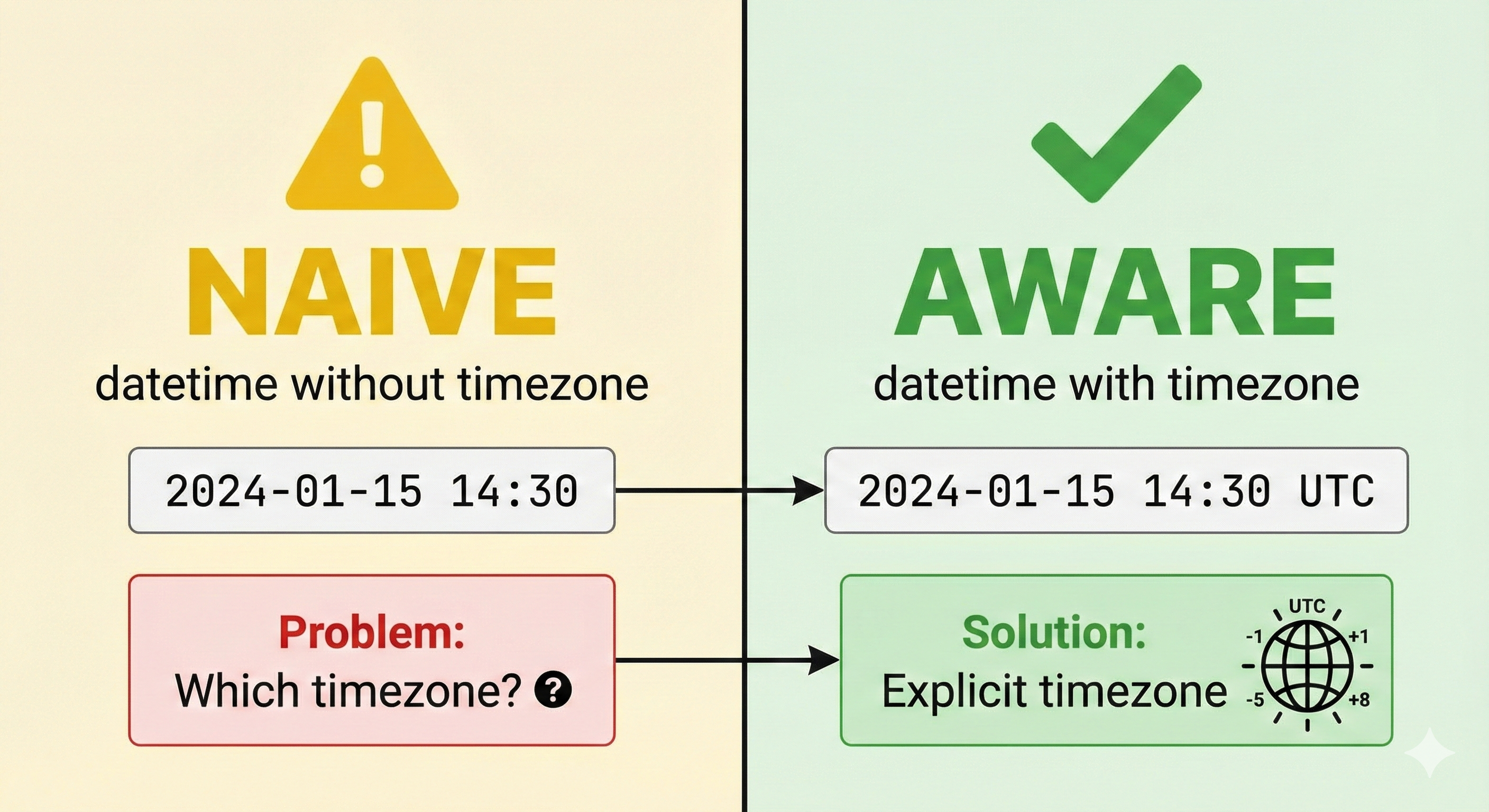
A naive datetime doesn't know what timezone it's in:
Loading Python environment...
An aware datetime knows its timezone:
Loading Python environment...
Why does this matter?
Imagine your application runs in three offices: New York, London, and Tokyo. If you store a naive datetime "14:30:00", which office is that? 2:30 PM where?
When building applications that span timezones (or might in the future), always use timezone-aware datetimes.
Loading Python environment...
💬 AI Colearning Prompt
"What's the difference between naive and timezone-aware datetime objects? Why do you hear 'always use UTC for storage' as a best practice?"
Here's the principle: Store all times in UTC (a universal reference), then convert to local timezones only when displaying to users.
Loading Python environment...
Notice the tzinfo=timezone.utc parameter—that's how you mark a datetime as timezone-aware.
Example: Complete Date and Time Parsing Workflow
Let's bring everything together with a realistic example:
Specification Reference: User enters birthday as "1999-03-15", and we need to store it as a date object.
AI Prompt Used: "Generate a function that parses a date string in YYYY-MM-DD format and returns a date object with error handling."
Loading Python environment...
Validation steps:
- ✅ Function accepts string input
- ✅ Uses
date.strptime()(Python 3.14 new method) - ✅ Returns
date | None(handles both success and failure) - ✅ Catches
ValueErrorwhen parsing fails - ✅ Includes type hints throughout
- ✅ Tested with valid and invalid input
🎓 Expert Insight
Notice the error handling: When the user enters "not-a-date", Python raises
ValueErrorwith a descriptive message. Your job isn't to memorize error messages—it's to catch them and provide helpful feedback to the user. AI helps you understand what went wrong.
Try With AI
Apply Python 3.14's new date/time parsing methods through AI collaboration that builds real-world datetime skills.
🔍 Explore Parsing Methods:
"Use Python 3.14's date.strptime() and time.strptime() to parse '2025-11-09' and '14:30:45'. Combine them with datetime.combine(). Explain why Python 3.14 added these class methods."
🎯 Practice Age Calculation:
"Build a function that parses birth date '1999-03-15' using date.strptime(), calculates age in years accounting for whether birthday occurred this year, and handles February 29 leap year births."
🧪 Test Naive vs Aware:
"Create naive datetime(2025, 11, 9, 14, 30, 0) and aware datetime with timezone.utc. Show what happens mixing them in subtraction. Explain when to use each and why mixing fails."
🚀 Apply Duration Formatting:
"Parse two datetimes, subtract to get timedelta, extract days/hours/minutes components, and format as '2 days, 3 hours, 15 minutes'. Test with realistic date ranges."