Understanding Modules and Imports
What Is a Module? — Why Organization Matters
The Problem: Imagine writing a huge Python script with thousands of lines. Finding a specific function becomes hard. Sharing code with others becomes confusing. Reusing code in different projects requires copying and pasting.
The Solution: Organize code into modules. A module is simply a .py file containing Python code—functions, variables, classes. Instead of writing everything in one file, Python developers split code logically:
math_operations.py— calculationsutilities.py— helper functionsmain.py— main program
Python comes with built-in modules (like math and random) that are ready to use immediately.
💻 Code Idea: What a Module Is
Think of a module like a toolbox. The toolbox contains tools (functions), and you access them by opening the toolbox (importing the module).
Loading Python environment...
Why this matters: The import math statement brings the entire math module into your script. Everything the math module offers becomes available.
💬 AI Colearning Prompt
Ask your AI: "What does a Python module look like? Show me the structure of a simple module file with 2-3 functions."
Expected Understanding: You see that a module is just a Python file with functions (and variables) defined in it. Nothing magical—just organized code.
🎓 Instructor Commentary
Syntax is cheap; organization is gold. The import statement is easy to write, but understanding why modules matter is the real skill. Modules let developers think in chunks: "Here's a file that handles math," "Here's a file that handles user input." This mental organization scales from small scripts to large applications. When you work with AI, clear module organization tells AI exactly where to find or modify code.
Import Pattern 1: import module_name — Full Module Access
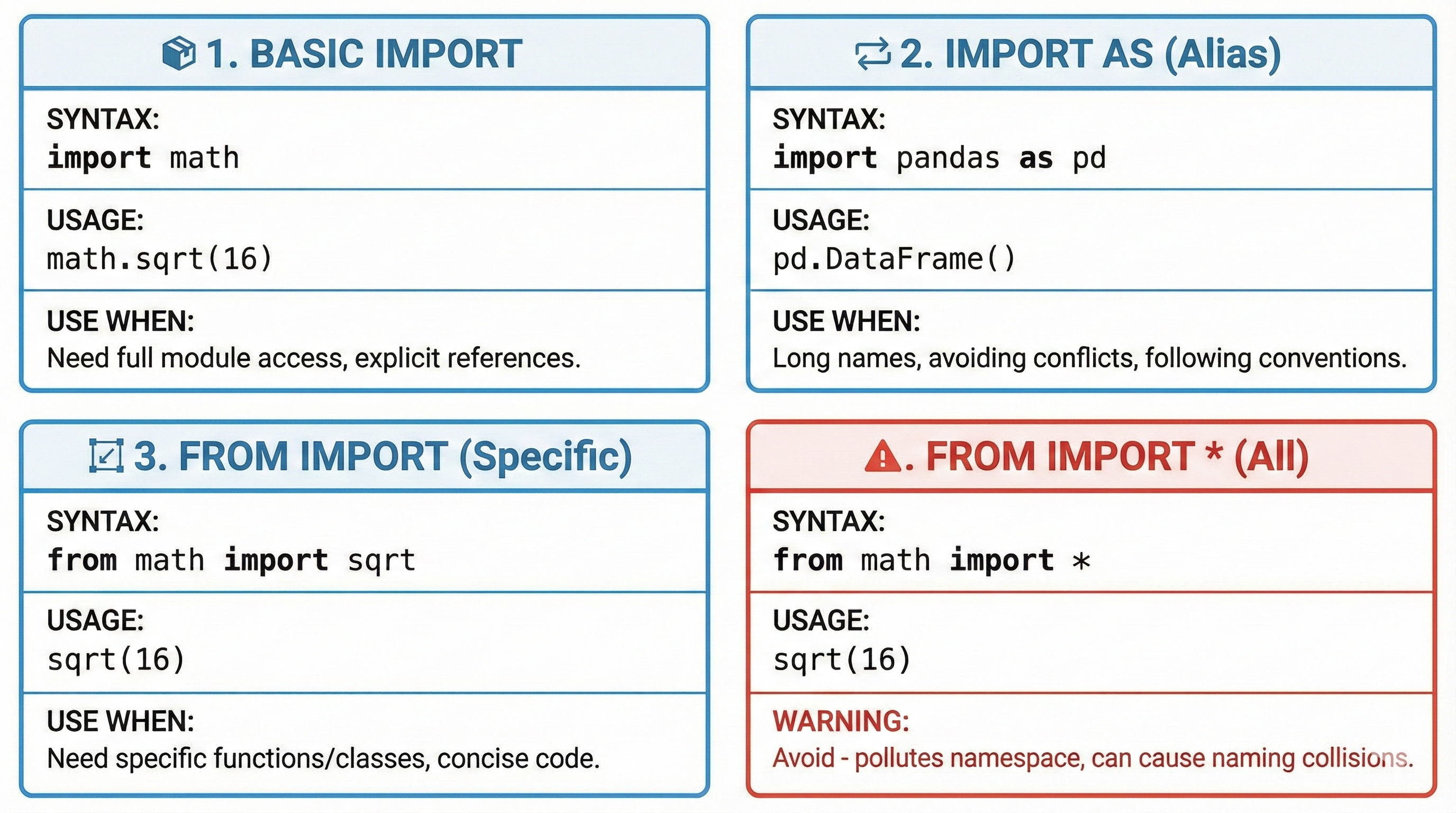
What it does: The statement import math brings the entire math module into your script. You access functions and variables using dot notation: math.function_name().
💻 Code Idea: Accessing a Module's Functions
Loading Python environment...
Why use this pattern?
- Clarity: When you see
math.sqrt(), you immediately know wheresqrtcomes from - Avoids naming conflicts: If you write your own
sqrtfunction,math.sqrtstill refers to the module's version - Professional pattern: This is how most Python code is written
When to use: Most of the time. Especially when a module name is short and you'll use multiple functions from it.
Import Pattern 2: from module import specific_function — Direct Import
What it does: The statement from math import sqrt brings only the sqrt function into your script. You use it directly without the module prefix: just sqrt(), not math.sqrt().
💻 Code Idea: Importing Specific Functions
Loading Python environment...
Why use this pattern?
- Brevity: Shorter code (
sqrt()instead ofmath.sqrt()) - When you use one function repeatedly: Reduces typing
Trade-off (be careful!)
- Less clarity: Someone reading your code might wonder where
sqrtcomes from - Potential conflicts: If you have your own
sqrtvariable, it shadows the imported one
When to use: When you're importing just 1-2 specific functions and you'll use them many times in your script.
Import Pattern 3: from module import function as alias — Aliased Import
What it does: The statement from math import sqrt as square_root imports the function but renames it. You use the new name in your code.
💻 Code Idea: Using Aliases for Clarity
Loading Python environment...
Why use aliases?
- Rename for clarity:
square_rootmight be clearer in your code thansqrt - Avoid naming conflicts: If you have a variable named
datetime, you can import the module asfrom datetime import datetime as dt - Shorthand for long names:
import numpy as npis industry standard
When to use: When a function name is unclear, or when you're avoiding a naming conflict, or when the module name is long.
Using Built-In Modules — Practical Examples
Math Module — Calculations
Loading Python environment...
Key Point: The max() and sum() are Python built-ins (always available). The math.floor() and math.sqrt() are from the math module (must import first).
Random Module — Non-Deterministic Operations
Loading Python environment...
Why this matters: The random module gives you non-deterministic behavior (unpredictable results). This is essential for games, simulations, and testing.
Reading Module Documentation — How to Learn What a Module Offers
The Reality: You don't need to memorize every function in every module. Instead, learn how to discover what a module offers.
💻 Code Idea: Discovering Module Functions
Loading Python environment...
The key skill: Being able to ask the right questions and explore modules with AI is more valuable than memorizing every function.
🚀 Specification Challenge
Think like a specification writer: You need code that picks a random element from a list. Describe what you want to your AI: "I have a list of options and I want to pick one at random. Which module should I use? How would I import it?"
Then tell your AI: "Show me the code for this." Notice how your clear description (specification) guides what AI generates.
✨ AI Tool Tip
Claude Code and Gemini CLI know all Python modules. Instead of guessing syntax, ask your AI:
- "How do I import the math module and calculate the square root of 25?"
- "Show me 3 useful functions from the random module"
- "What's the difference between these import styles?"
This is how professionals work—not from memory, but from clear thinking and AI partnership.
Try With AI
Master module organization and import patterns through hands-on exploration.
🔍 Explore Import Patterns:
"Compare these three import styles:
import math,from math import sqrt, andfrom math import sqrt as square_root. Show me when each pattern is appropriate with calculator examples."
🎯 Practice Module Organization:
"I have scattered calculator code in one file with calculations, validation, and display mixed together. Help me design a 3-module structure, then refactor the code showing which import pattern fits each module best."
🧪 Test Name Collision Handling:
"Create code demonstrating import name collision between
statistics.meanandnumpy.mean. Show me three different solutions using import aliases, and explain when each approach is best for production code."
🚀 Apply Professional Structure:
"Build a data_processor project with calculations.py, validators.py, formatters.py, and main.py. Each module uses a different import pattern (import X, from X import Y, as Z). Include comments explaining your import strategy choices."