Understanding Pipes and Complex Commands
Pipes Are Assembly Lines for Data
Imagine a factory assembly line:
- Station 1 produces raw materials
- Station 2 refines them based on criteria
- Station 3 counts the final products
Bash pipes work exactly the same way. Output from one command becomes input to the next. You build complex operations by connecting simple commands together.
By the end of this lesson, you'll:
- Understand pipes as data flow (not syntax rules)
- Trace data through pipelines step by step
- Request complex operations and understand how they work
Use Pipes to Filter Data
Let's watch a conversation about finding specific files.
You: "I want to find all Python files in my project. How would you do that?"
Agent: "I could list all files and then filter to show only Python files. Let me show you:"
$ ls -la
total 48
drwxr-xr-x@  13 mjs  staff    416 Nov  2 03:06 .
drwxr-xr-x@   7 mjs  staff    224 Nov  2 03:00 ..
-rw-r--r--@   1 mjs  staff   2819 Oct 31 16:16 CLAUDE.md
-rw-r--r--@   1 mjs  staff   8340 Oct 31 16:16 README.md
-rw-r--r--@   1 mjs  staff   1200 Oct 31 16:16 app.py
-rw-r--r--@   1 mjs  staff   900 Oct 31 16:16 utils.py
-rw-r--r--@   1 mjs  staff   1100 Oct 31 16:16 config.py
Agent: "That's a lot of output. Let me filter it to show only .py files:"
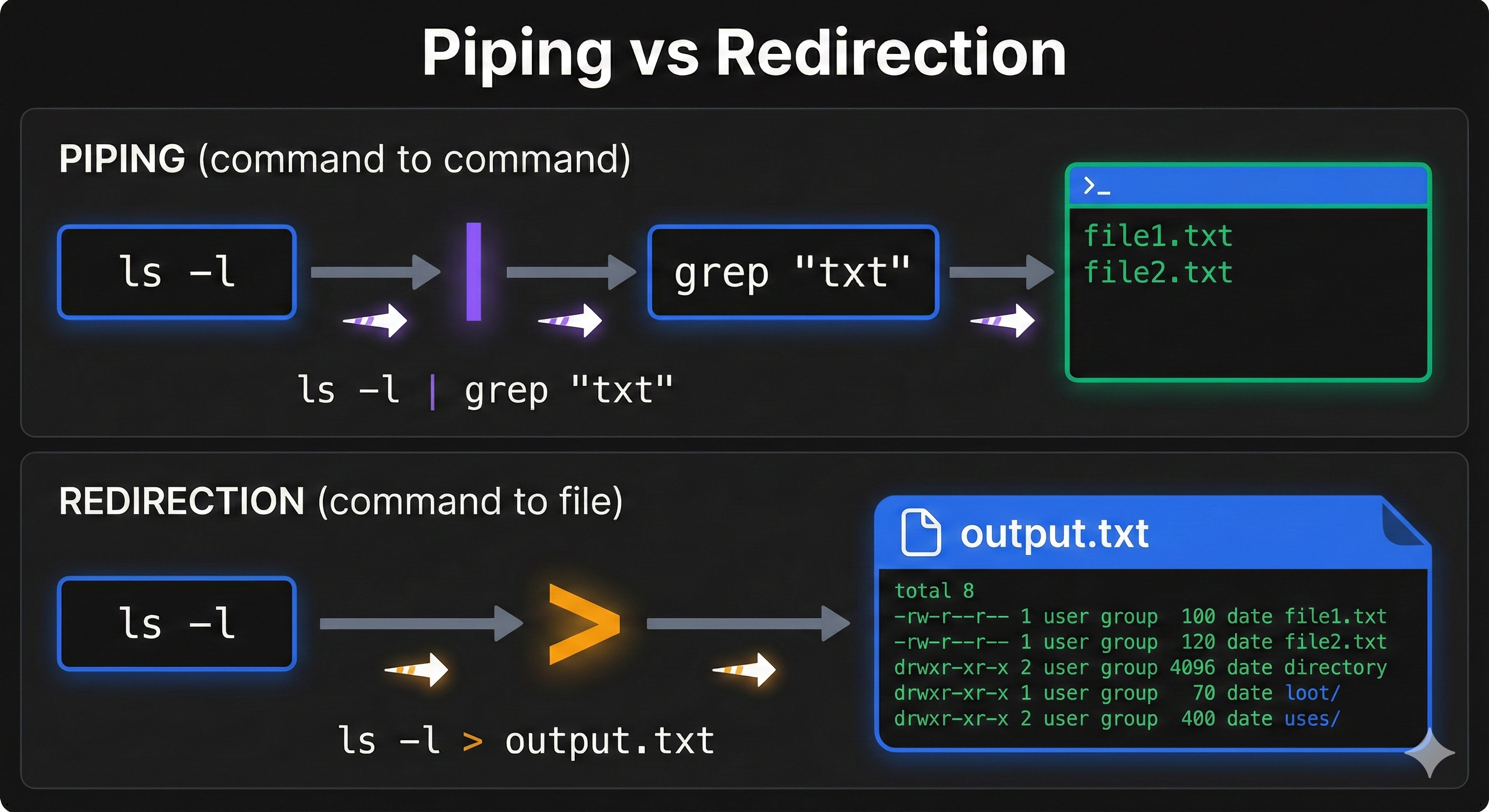
$ ls -la | grep ".py"
-rw-r--r--@   1 mjs  staff   1200 Oct 31 16:16 app.py
-rw-r--r--@   1 mjs  staff   900 Oct 31 16:16 utils.py
-rw-r--r--@   1 mjs  staff   1100 Oct 31 16:16 config.py
Agent: "See what happened? ls -la produces a list. The pipe | sends that list to grep. grep filters it to show only lines containing .py. Three Python files."
You: "So the pipe connects the commands?"
Agent: "Yes. ls does its job (list files). The pipe takes its output. grep does its job (find lines matching a pattern). The result is only the Python files."
Understanding Pipes Visually
That dialogue shows the key concept:
ls -la (list all files)
   ↓
   | (pipe: send output to next command)
   ↓
grep ".py" (filter to lines containing ".py")
   ↓
Output: Only Python files
Why pipes matter:
- You build complex operations from simple commands
- Each command does one thing well
- Pipes chain them together
- The output of one becomes input to the next
💬 AI Colearning Prompt
"Why do pipes use the
|symbol? What's the conceptual connection between 'pipeline' and the vertical bar character?"
Chain Multiple Commands with Pipes
Now let's make it more complex. You want to not just find Python files, but count them.
You: "How many Python files are in this project?"
Agent: "I can chain three commands together to answer that:
- List all files with
ls -la - Filter to Python files with
grep ".py" - Count the results with
wc -l(word count, line count)"
$ ls -la | grep ".py" | wc -l
3
Agent: "Here's what happened step by step:
ls -laproduced 8 lines of outputgrep ".py"filtered it to 3 lines (the Python files)wc -lcounted those 3 lines- Result: 3 Python files"
You: "I see three numbers in the ls output. Does pipe send all of them?"
Agent: "Yes. The pipe sends the ENTIRE OUTPUT of one command to the next. grep sees:
-rw-r--r--@   1 mjs  staff   1200 Oct 31 16:16 app.py
-rw-r--r--@   1 mjs  staff   900 Oct 31 16:16 utils.py
-rw-r--r--@   1 mjs  staff   1100 Oct 31 16:16 config.py
grep checks each line. If the line contains .py, it passes it to wc -l. wc -l counts them. Three lines, so the count is 3."
Search and Filter Log Files with Pipes
Let's trace a more practical pipeline.
You: "I have a log file with thousands of lines. I want to find all ERROR messages and count them. Can you do that?"
Agent: "Absolutely. I'll use a pipeline to search logs:
$ cat application.log | grep "ERROR" | wc -l
247
Here's the flow:
cat application.log- outputs all 10,000 linesgrep "ERROR"- filters to only lines containing "ERROR" (247 lines)wc -l- counts those 247 lines Result: 247 errors"
You: "What if I want to see the actual error lines, not just count them?"
Agent: "Just stop before the count step. The pipe would be:
$ cat application.log | grep "ERROR"
[shows all 247 error lines]
Remove the | wc -l and you see each error message. Each step of the pipeline can be an output point."
Understanding Pipeline Steps
Here's the key insight about pipes:
You can trace a pipeline by imagining data flowing through it:
Input Data → Command 1 → Command 2 → Command 3 → Final Output
Each command transforms the data in some way:
ls -la→ produces file listinggrep→ filters lineswc -l→ counts lines
The power: You build complex operations by combining simple commands.
🎓 Expert Insight
In AI-native development, you don't memorize pipe syntax like
grep | awk | sed | sort | uniq. You understand WHAT you need ("filter these logs, extract column 5, remove duplicates"), and AI chains the commands. Your job: understand each step's purpose, verify the output makes sense.
Build Complex Pipelines for Real Problems
Let's see a sophisticated pipeline that solves a real problem.
You: "I want to find all Python files in my project, see their sizes, and identify which ones are larger than 1000 bytes."
Agent: "That's more complex. Let me build it step by step:
$ find . -name "*.py" -type f -exec ls -lh {} \; | awk '{print $5, $NF}' | awk '$1 ~ /K|M/'
27K ./big_script.py
3.2K ./utils.py
1.5K ./config.py
Let me trace what happened:
find . -name "*.py" -type f- locates all Python filesls -lh {} \;- gets size and name of each fileawk '{print $5, $NF}'- extracts size and filenameawk '$1 ~ /K|M/'- filters to files larger than 1KB (K for kilobytes, M for megabytes)
Result: Three Python files larger than 1KB, with their sizes."
You: "That seems complicated. How would I learn to write something like this?"
Agent: "You wouldn't write it yourself. Your AI builds it based on your plain English request. You supervise by asking at each step: 'What does that command do? Is this data transformation what I wanted?' You don't memorize awk syntax. You understand the flow."
Why Understanding Pipes Matters
Pipes are central to bash because they're:
- Powerful: Combine simple commands into complex operations
- Composable: Each command does one thing; pipes connect them
- Traceable: You can understand data flow step by step
When you ask your AI to:
- "Find all errors in the log file and count them" →
grep | wc - "List Python files larger than 10MB" →
find | grep | awk - "Show me repeated errors and their frequency" →
grep | sort | uniq -c
Your AI builds the pipeline. You understand what's happening by tracing the data flow.
🤝 Practice Exercise
Ask your AI: "Find all files in the current directory containing 'error', count how many matches exist, and explain each step of the pipeline. Then modify the pipeline to show only unique error messages."
Expected Outcome: You understand how to chain grep, sort, uniq, and wc commands, and can request pipeline modifications from AI.
Try With AI: Side-by-Side Pipeline Building
Now that you understand pipes as data flow, compare what happens when your AI builds pipelines.
Comparison Prompt
Open your AI tool and ask:
Prompt:
I need to analyze my project files.
Build a pipeline that:
1. Lists all files
2. Filters to Python files
3. Counts them

Explain what each command does and how data flows between them.
What to Compare:
| Pipeline Step | You Think About | Your AI Builds |
|---|---|---|
| Find files | ls -la | (AI's listing command) |
| Filter them | grep ".py" | (AI's filtering command) |
| Count them | wc -l | (AI's counting command) |
| Data flow | all files → Python files → count | (Same pattern) |
Observation: You specified WHAT you wanted (count Python files), AI built the HOW (pipeline). Then you traced the data flow to understand it. This is how complex workflows become understandable through AI collaboration.
Try With AI: Trace and Modify Pipelines
Ask your AI:
Prompt:
Using the pipeline from above (list → filter → count Python files):
1. Show me what intermediate output looks like between each step
   (What does "list → filter" produce before counting?)
2. Now modify it to count Python files that start with 'test_'
3. Show what changed and why
4. How would we show the files AND their sizes instead of just counting?
Expected Response: Your AI will show the intermediate outputs at each stage and explain how modifications change the data flow. This builds your understanding of pipelines as transformations.
Key Principle: Pipes are powerful because you can trace, predict, and modify them by understanding data flow.
Key Insight: Through iterative refinement (trace → understand → modify → verify), you and AI converge on pipelines that solve your exact need. You're not memorizing syntax—you're reasoning about data transformations.