Set Basics
Sets are Python's answer to a common problem: How do you store a collection of unique items efficiently? When you need to automatically eliminate duplicates and check if something exists quickly, sets are the perfect tool.
In this lesson, you'll learn what makes sets special, how to create them with modern Python type hints, why they require immutable elements, and how to add and remove items. By the end, you'll understand when to choose sets over lists—and more importantly, why that choice matters.
What Makes Sets Different?
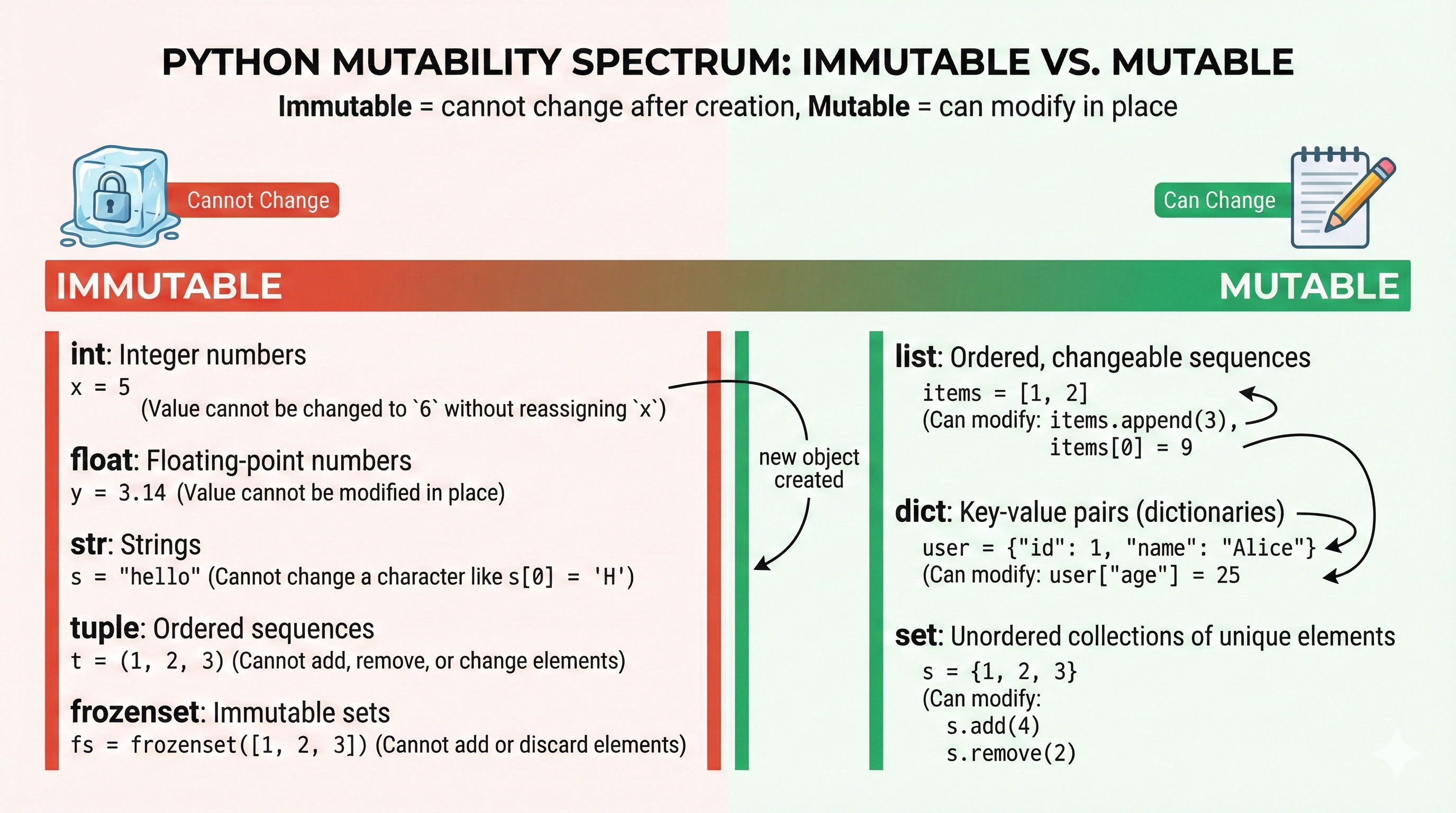
Before we dive into syntax, let's understand what sets actually do. A set is an unordered collection of unique, hashable elements. That's three important properties:
Uniqueness: Sets automatically eliminate duplicates. If you try to add "apple" twice, it stays in the set only once.
Unordered: Unlike lists, sets don't maintain insertion order. When you iterate over a set, elements might appear in any order (though the order is consistent within a Python session). This might seem like a limitation, but it's the price sets pay for their speed.
Hash-Based Storage: Sets use Python's hashing mechanism internally, which enables O(1) lookup time—meaning checking if an item exists is incredibly fast, even in massive sets.
💬 AI Colearning Prompt
"Why would I use a set instead of a list for checking if a value exists in a large collection?"
This question gets at the heart of why sets exist. Your AI can walk you through the performance difference and explain when the choice matters practically.
🎓 Expert Insight
In AI-native development, you don't memorize when to use which collection type. You understand the properties—uniqueness, speed of lookup, unordered nature—and choose based on what your code needs. Your AI assistant can explain trade-offs instantly.
Creating Sets
There are two main ways to create a set: using literal syntax with curly braces, or using the constructor.
Set Literal Syntax
The most straightforward way to create a set is with curly braces and values:
Loading Python environment...
Notice the type hints: set[int] means "a set containing integers," and set[str] means "a set containing strings." Modern Python (3.9+) lets you use this bracket syntax instead of older Set[int] from the typing module.
Set Constructor
You can also create sets from other collections using the set() constructor:
Loading Python environment...
Important: The empty set must be created with set(), not {}. The brackets {} alone create an empty dictionary, not an empty set. This is a common gotcha!
🚀 CoLearning Challenge
Ask your AI Co-Teacher:
"Create a set from a list of numbers that has many duplicates. Show me how the set automatically removes the duplicates. Then explain why Python needed a separate
set()constructor for empty sets instead of just using{}."
Expected Outcome: You'll see the deduplication in action and understand the historical reason for the set() syntax quirk.
💬 AI Colearning Prompt
"Why does Python use curly braces
{}for sets when they look like dict syntax? How does Python distinguish between an empty set and an empty dict?"
The Uniqueness Property
Sets automatically eliminate duplicates. This is their superpower. Let's see this in action:
Code Example 1: Creating Sets with Type Hints
Loading Python environment...
Key observation: Notice that from_list shows {1, 2, 3}, not {1, 2, 3, 3, 2, 1}. The duplicates are gone automatically.
Code Example 2: Understanding Uniqueness
Loading Python environment...
This pattern is incredibly common: you have a collection with potential duplicates, and you need to know the unique values. Sets solve this instantly.
🎓 Expert Insight
In AI-native development, you don't memorize when to use sets vs. lists—you recognize the pattern. When you see "unique values" or "eliminate duplicates," that's your cue. Ask your AI: "Should I use a set here?" and it'll explain why uniqueness matters for your specific problem.
The Hashability Requirement
Here's where sets get philosophical. Sets can only contain hashable elements—values that are immutable and won't change. Why? Because sets use Python's hashing mechanism to store and look up items efficiently.
A hash value is a special integer that Python computes from an object. For a set to work, an object's hash value must never change. If an object is mutable (can be modified), its hash might change, breaking the set's internal structure.
Hashable types (safe in sets):
- Integers:
{1, 2, 3} - Strings:
{"a", "b", "c"} - Tuples:
{(1, 2), (3, 4)} - Frozensets:
{frozenset([1, 2]), frozenset([3, 4])}
Unhashable types (will cause errors):
- Lists:
{[1, 2, 3]}❌ Lists are mutable - Dictionaries:
{{"a": 1}}❌ Dicts are mutable - Sets:
{{1, 2}, {3, 4}}❌ Sets themselves are mutable
Code Example 3: Modifying Sets
Loading Python environment...
Notice the difference: .remove() raises an error if the element doesn't exist, while .discard() silently does nothing. Use .remove() when you're certain the element exists; use .discard() when you're not sure.
💬 AI Colearning Prompt
"When would I use
.remove()instead of.discard()in real code? Show me a scenario where the difference matters."
Your AI can help you think through when you want an error to alert you versus when you want silent tolerance.
Code Example 4: The Hashability Requirement
Loading Python environment...
The error message "unhashable type" is Python's way of saying "I can't guarantee this value won't change, so I won't let you put it in a set."
🤝 Practice Exercise
Ask your AI: "Create a set containing both integers and tuples. Then try to add a list to that set and explain why it fails. What could I use instead of a list to make it work?"
Expected Outcome: You'll understand immutability requirements through hands-on experimentation and learn that tuples (immutable) work where lists (mutable) don't.
Practice: Build Your Understanding
Try these exercises to reinforce what you've learned:
Exercise 1: Create Sets with Type Hints
Create three different sets:
- A set of integers from 1 to 5 (using literal syntax)
- A set of your favorite colors as strings
- An empty set with type hint
set[str]
Verify each one by printing it and checking its type.
Exercise 2: Deduplication Challenge
Create a list with many duplicate names:
Loading Python environment...
Convert it to a set and compare the lengths. How many duplicates were there?
Exercise 3: Error Handling with Unhashable Types
Try adding different types to a set (integers, strings, tuples, then lists):
Loading Python environment...
For each one, predict whether it will work. Then run it and observe the error (if any). Write a brief explanation of why each one succeeded or failed.
Exercise 4: add() vs remove() vs discard()
Create a set with three colors. Then:
- Add a new color
- Remove an existing color (using
.remove()) - Try to discard a color that doesn't exist (using
.discard()) - Try to remove a color that doesn't exist and observe the error
Why did step 4 fail while step 3 succeeded?
🚀 CoLearning Challenge
Ask your AI Co-Teacher:
"Create a real-world scenario where you'd want to deduplicate a list using a set. Show me the code with type hints. Then explain: if order matters, would a set still work? Why or why not?"
Expected Outcome: You'll see a practical application and understand the trade-off between uniqueness and order.
Try With AI
Master set creation, deduplication, and understand hashability constraints.
🔍 Explore Set Deduplication:
"Show me converting lists with duplicates to sets: user_ids [101, 102, 103, 101, 104, 102, 105, 101], product_codes ['A1', 'B2', 'C3', 'A1', 'D4', 'B2'], temps [23.5, 24.0, 23.5, 22.1, 24.0]. For each, show unique count, type hints, explain what information is lost (order? duplicate counts?)."
🎯 Practice Hashability Rules:
"Help me test which types work in sets: tuples (immutable), lists (mutable), frozensets (immutable), dicts (mutable). For each, predict if it works, show exact error if it fails, explain the hashability rule."
🧪 Test Empty Set Syntax:
"Debug the quirk: why is empty = a dict, not a set? Show correct empty set syntax. Explain when creates dict vs when set literal 3 works."
🚀 Apply to Tag System:
"Build blog tag deduplication: extract all tags from posts, normalize to lowercase ('Python' and 'python' merge), remove empty tags, convert to unique set, sort alphabetically. Show complete code with type hints."