Compiling MCP to Skills
You've learned MCP servers connect Claude Code to external systems. You've mastered skills as encoded expertise. Now: what happens when you want both, but MCP's token consumption makes it expensive?
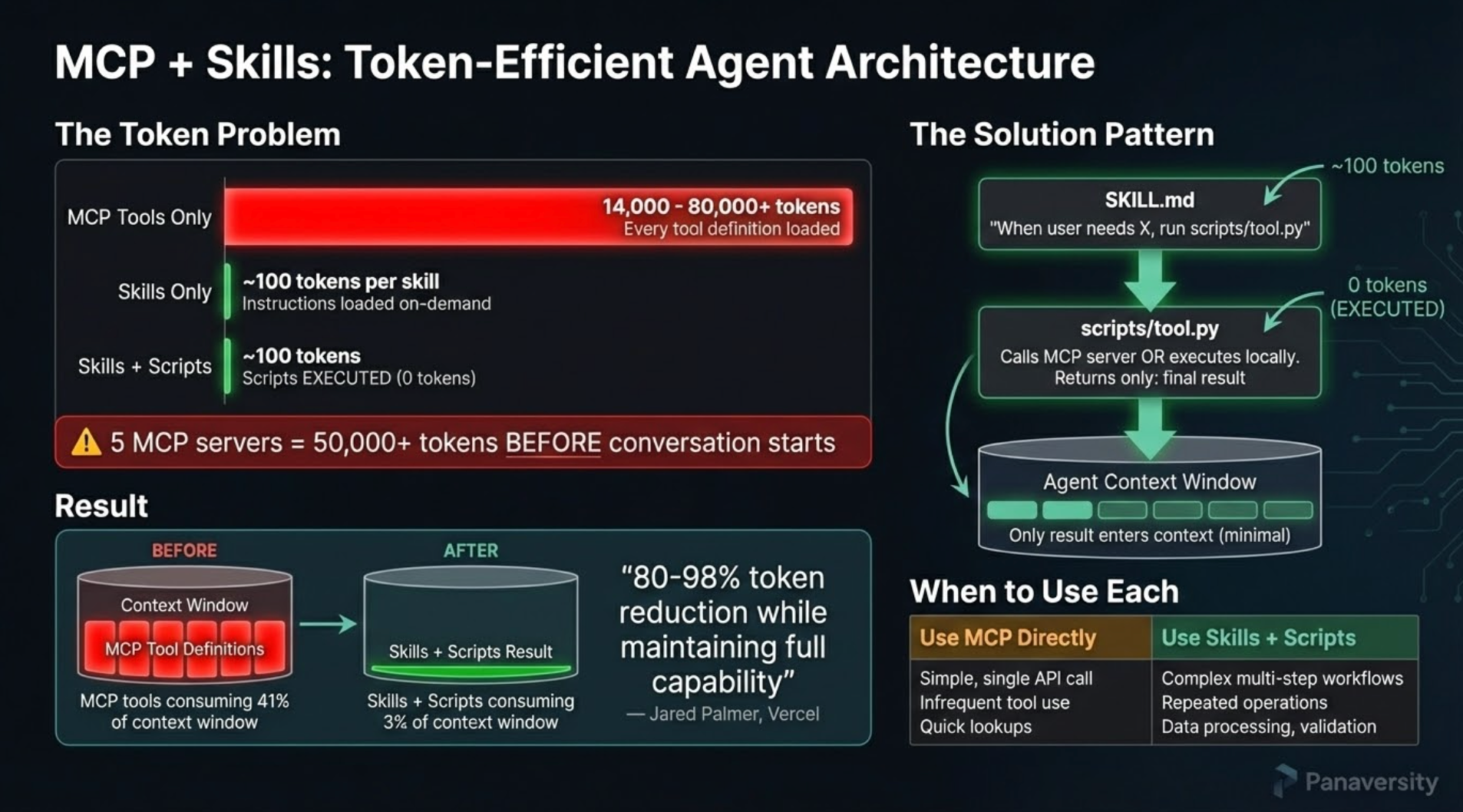
This lesson shows you a powerful pattern: compile high-token MCP servers into lean skills, reducing context consumption by up to 98.7% while maintaining full functionality.
Skills format is now supported by Claude Code, OpenAI Codex (beta), and Goose. Skills you compile here work across all three agents.
The Problem: MCP Token Bloat
When Claude Code loads an MCP server, it eagerly loads ALL tool definitions upfront. Here's the real impact from Anthropic's engineering blog:
"Tool descriptions occupy more context window space, increasing response time and costs. For agents with thousands of tools, this means processing hundreds of thousands of tokens before reading a request." — Anthropic, Code Execution with MCP
Concrete examples from the blog:
- Agent with 1,000 tools: 150,000 tokens loaded before your first request
- 2-hour meeting workflow: Fetching transcript from Google Drive and attaching to Salesforce = 50,000 additional tokens for repeated data processing
- Compiled skill approach: Reduces to ~2,000 tokens (98.7% reduction)
The math for a single MCP server: Playwright MCP loads approximately 5,000-8,000 tokens of tool definitions. Use it 3 times in a session? That's 15,000-24,000 tokens of overhead—before you've accomplished anything.
💬 AI Colearning Prompt
"I have 3 MCP servers installed. Help me estimate my token overhead: For each server, how many tokens does it load at startup? What's my total context cost before I've even asked a question?"
The Solution: Code Execution Pattern
Instead of calling MCP tools directly through Claude's context, compile them into skills with executable scripts:
The Architecture
SKILL.md + Scripts Model:
.claude/skills/browser-use/
├── SKILL.md                    # High-level procedures (~150 tokens)
├── references/                 # Cached tool documentation
└── scripts/
    ├── mcp-client.py          # Universal MCP client (HTTP/stdio transport)
    ├── start-server.sh        # Starts Playwright MCP on localhost:8808
    └── stop-server.sh         # Stops server gracefully
How It Works:
- SKILL.md provides high-level procedures (loaded once at startup, ~150 tokens)
- Claude executes bash commands calling
mcp-client.py(runs locally, outside context) - mcp-client.py connects to Playwright MCP server via HTTP transport
- Server performs browser operations (navigate, extract, screenshot)
- Only filtered results returned to Claude's conversation
Token Comparison:
- Direct MCP: ~5,000-8,000 tokens × 3 calls = ~15,000-24,000 tokens
- Compiled skill: ~150 tokens (SKILL.md) + 0 tokens (local scripts) = ~150 tokens
- Savings: ~98-99%
Progressive Disclosure: 3-Stage Loading
Skills use three-level loading (covered in Lesson 6) to minimize token consumption:
- Discovery (startup): Load only
descriptionfield (~30 tokens) - Activation (when relevant): Load full SKILL.md (~150 tokens)
- Execution (when needed): Run
scripts/locally (0 tokens in context)
Key for compiled skills: Stage 3 executes MCP tools outside Claude's context, so heavy operations consume zero tokens.
Example:
User: "Extract product prices from Amazon"

→ Stage 1: Match description "browser automation"
→ Stage 2: Load SKILL.md procedures
→ Stage 3: Execute script locally (filter 1000 → 20 products)
→ Return only 20 results to Claude
Why Scripts Save Tokens
Without scripts (direct MCP):
User request → Claude calls browser_navigate (2,000 tokens loaded)
            → Claude calls browser_evaluate (3,000 tokens loaded)
            → Returns 1,000 product objects (10,000 tokens in context)
            → Claude filters to 20 relevant (10,000 tokens wasted)
Total: 15,000 tokens
With scripts (code execution):
User request → Claude runs bash command (0 tokens - executes locally)
            → bash: python mcp-client.py call -t browser_navigate ...
            → bash: python mcp-client.py call -t browser_evaluate ...
            → Server filters/processes data locally
            → Returns only final result to Claude (~200 tokens)
Total: ~200 tokens
Savings: ~98-99%
Hands-On: Use browser-use Skill from Skills Lab
You'll experience the power of compiled skills by using the pre-built browser-use skill from Skills Lab, then comparing its token efficiency against direct MCP usage.
Step 1: Download Skills Lab
If you haven't already downloaded Skills Lab from Lesson 4, do so now:
- Go to github.com/panaversity/claude-code-skills-lab
- Click the green Code button
- Select Download ZIP
- Extract the ZIP file
- Open the extracted folder in your terminal
If you already downloaded Skills Lab in Lesson 4, navigate to that folder.
Step 2: Baseline - Try Playwright MCP Directly
First, let's see the token overhead WITHOUT compilation. If you have Playwright MCP configured in Claude Code, start Claude:
claude
Ask Claude to use Playwright MCP directly:
Use the Playwright MCP server to navigate to https://example.com
and extract the main heading text.
What happens:
- Claude loads ALL Playwright MCP tool definitions (~5,000-8,000 tokens)
- Calls
browser_navigatetool through context - Calls
browser_evaluateorbrowser_snapshotthrough context - Full tool schemas processed for each call
- Returns result
Observe: This works, but notice the initial loading overhead when Claude loads tool definitions.
Step 3: Now Use browser-use Skill
Exit Claude (Ctrl+C) and restart for a fresh session in the Skills Lab folder:
claude
Now ask using the compiled skill:
Use browser-use skill to navigate to https://example.com
and extract the main heading text.
What happens:
⏺ Skill(browser-use)
  ⎿  Loading…

────────────────────────────────────────────────────────────────────
 Use skill "browser-use"?
 Claude may use instructions, code, or files from this Skill.

   Browser automation using Playwright MCP. Navigate websites, fill forms,
   click elements, take screenshots, and extract data.

 Do you want to proceed?
 ❯ 1. Yes
  2. Yes, and don't ask again for browser-use in this directory
  3. No
Select 1. Yes.
What happens now:
- Claude loads browser-use SKILL.md (~150 tokens only)
- Skill tells Claude to run:
bash scripts/start-server.sh(starts Playwright MCP on localhost:8808) - Claude executes bash commands:
python mcp-client.py call -u http://localhost:8808 -t browser_navigate \
-p '{"url": "https://example.com"}' - Script runs OUTSIDE Claude's context (0 tokens consumed)
- Only the result comes back: page snapshot showing heading "Example Domain"
- Claude runs another command to extract heading:
python mcp-client.py call -u http://localhost:8808 -t browser_evaluate \
-p '{"function": "() => document.querySelector('h1').textContent"}' - Result returned:
"Example Domain"(~100 tokens) - Claude stops server:
bash scripts/stop-server.sh
Key Difference: Tool definitions NEVER loaded into Claude's context. All browser operations happen locally via HTTP calls.
Step 4: Compare Token Usage
Ask Claude:
Compare the token usage between:
1. Using Playwright MCP directly (what we did in Step 2)
2. Using browser-use skill (what we just did in Step 3)

Estimate the tokens consumed in each approach and
show me the percentage reduction.
Expected explanation:
Direct Playwright MCP:
- Tool definitions loaded at startup: ~5,000-8,000 tokens
- browser_navigate call in context: ~2,000 tokens
- browser_evaluate call in context: ~2,000 tokens
- Result processing: ~500 tokens
- Total: ~9,500-12,500 tokens

browser-use skill:
- SKILL.md loaded: ~150 tokens
- Bash commands executed: 0 tokens (runs locally)
- Only final results returned: ~100 tokens
- Total: ~250 tokens

Reduction: ~97-98% token savings
Step 5: Test Different Browser Operations
Try various automation tasks to see the skill in action:
1. Use browser-use to take a screenshot of https://github.com and save it
2. Use browser-use to extract the page title from https://news.ycombinator.com
3. Use browser-use to check if example.com contains the text "documentation"
Observe:
- Each operation runs bash commands locally
- You see:
python mcp-client.py call -t <tool_name> ... - Server starts once, handles multiple operations
- Only filtered results come back to conversation
- Claude doesn't reload tool definitions
Step 6: Explore How browser-use Works Internally
After trying the skill, explore its structure:
# Look at the skill structure
ls -la .claude/skills/browser-use/
You'll see:
SKILL.md           # Procedures Claude follows (~150 tokens)
references/        # Cached tool documentation
scripts/           # Scripts Claude executes locally
This is the code execution pattern: Heavy operations happen in local HTTP server, outside Claude's token-counted context.
💬 AI Colearning Prompt
"I've used browser-use skill. Explain: (1) How does running mcp-client.py via bash save tokens vs calling MCP tools through Claude's context? (2) What happens when Claude executes 'python mcp-client.py call -t browser_navigate'? (3) If I performed 10 browser operations, what would be the token difference between direct MCP vs browser-use skill?"
When to Compile MCP Servers
Not every MCP server benefits from compilation. Use this decision framework:
Compile to Skill When:
✅ High token overhead (>5,000 tokens per query)
- Example: Playwright, Google Drive, Database MCP
✅ Frequent use (3+ times per session or across projects)
- Repeated calls multiply token waste
✅ Large datasets returned (need filtering/transformation)
- Processing 1,000 items → returning 20 relevant ones
✅ Multi-step workflows (chaining operations)
- Navigate → extract → transform → filter
Use Direct MCP When:
❌ Low token overhead (<1,500 tokens per query)
- MCP already efficient, compilation overhead not worth it
❌ Infrequent use (once per month or less)
- Setup cost > token savings
❌ Small, well-formatted results (no transformation needed)
- Results already optimal for Claude
❌ Rapidly changing API (MCP tools frequently updated)
- Skill scripts would need constant maintenance
Decision Framework: When to Compile vs. Use Direct MCP
Not every MCP server needs compilation. Use this matrix to decide:
| Scenario | Recommendation | Reasoning |
|---|---|---|
| One-off query | Use MCP directly | Compilation overhead not worth it for single use |
| Repeated workflow (3+ times) | Compile to skill | Amortizes compilation cost across multiple uses |
| High token definitions (5,000+ tokens) | Compile to skill | Token savings justify upfront work |
| Low token definitions (<500 tokens) | Use MCP directly | Compilation provides minimal benefit |
| Rapidly changing API | Use MCP directly | Compiled skill becomes stale quickly |
| Stable tool set | Compile to skill | Skill remains accurate over time |
| Privacy-sensitive data | Compile to skill | Local script execution avoids context logging |
| Integration with other skills | Compile to skill | Composability improves with skill format |
| Team workflow | Compile to skill | Shareable SKILL.md vs proprietary MCP setup |
Decision shortcut:
- Calling MCP 1-2 times? → Use direct MCP
- Calling MCP 3+ times in same session? → Compile to skill
- Working with high-token server? → Compile to skill
- Building production workflow? → Compile to skill
What's Ahead
You've experienced compiled skills and their massive token reduction—up to 98% savings while preserving full functionality. You understand the code execution pattern and why it works. But what happens when you need multiple skills working together on complex tasks?
Lesson 10: Subagents and Orchestration introduces the next level: specialized AI assistants that handle specific types of work with isolated context. Where compiled skills give you efficiency, subagents give you coordination—a team of focused specialists instead of one overloaded generalist.
In advanced lessons, you'll learn to create your own compiled skills using skill-creator, compiling other MCP servers (Google Drive, Database, etc.) and designing custom workflows. The skills you use from Skills Lab now become templates for creating your own later.
Sources
Research and tools supporting this lesson:
- Anthropic: Code Execution with MCP — Architecture for local execution + context reduction
- Armin Ronacher: Skills vs Dynamic MCP Loadouts — Token efficiency analysis and pattern recommendations
- SmartScope: MCP Code Execution Deep Dive — Detailed compilation workflow examples
- Claude Code Documentation: MCP Integration — Official MCP protocol reference
Try With AI
Use browser-use Skill:
"I've downloaded the Skills Lab. Guide me through using the browser-use skill to extract product names from an e-commerce site. Show me the token savings compared to direct MCP."
Measure Token Reduction:
"I used browser-use skill for 3 browser operations. Calculate the token savings: (1) Estimate tokens if I used Playwright MCP directly, (2) Estimate tokens with browser-use skill, (3) Show percentage reduction with explanation."
Understand Internals:
"Open the browser-use skill files and explain: (1) What does SKILL.md contain? (2) What do the scripts in scripts/ folder do? (3) How does this achieve token reduction?"
Decide When to Use:
"I have these MCP servers installed: [list]. For each, should I look for a compiled skill or use direct MCP? Use the decision framework to recommend."
Compare Direct MCP vs Compiled Skill:
"I want to understand the difference: (1) Run a browser automation task using Playwright MCP directly, (2) Run the same task using browser-use skill, (3) Show me the exact token difference and explain where savings come from."
Explore Skills Lab:
"What other compiled skills are available in Skills Lab? For each skill, explain: (1) What MCP server it compiles, (2) What operations it supports, (3) When I should use it vs direct MCP."